


Small Business Website Design: 5 Things Your Site Needs
Table of Contents
By Guy Tomlinson, Managing Director, SEO CoPilot
Good small business website design starts with your customers, not your colours. Your site needs to show who you help, the problems they have, how you solve them and why they should choose you. Then it needs a page for each service, clear details of where you work and an easy way to get in touch.
Small business website design is the planning, layout and building of a website for a small firm. The aim is a site that brings in enquiries, not one that just looks nice.
We have designed and built over 247 websites from our Chesterfield studio since 2012. This guide covers the five things a good site needs, the mistakes we see along the way and what a website costs in the UK. It also covers how to plan a site and whether to use a website builder or a web designer.

What makes good website design for small business?
Good website design for small business does five things well. It speaks to your customers’ problems, gives each service its own page and shows where you work. It also makes the next step obvious and works well on a phone.
Google says its ranking systems favour helpful, reliable content “created to benefit people”. We take that to mean writing for your customers first.
1. Speak to your target audience’s problems
Your target audience is the group of people most likely to buy from you. Each page should name the problem they come with, show how you solve it and give a reason to choose you. Back that up with reviews, photos of real jobs and clear prices or price guides.
The most common mistake we see is a site that lists what the business does but never names the customer’s problem. Visitors leave without knowing why they should pick you.
2. Give every service its own page
A separate services page for each thing you offer lets you explain it properly. In our view, it also gives Google a clear page to show when someone searches for that service.
We often see small business sites squeeze every service onto a single page, which leaves Google one page to choose for several different searches.
3. Show where you work
Say which towns and areas you cover, in your page text and on your contact page. In our view, that helps customers and Google see where you work. For map listings, Google says it mainly bases local results on relevance, distance and popularity.
Many sites we see never mention their town or service area. That makes it harder to show up for local searches such as “electrician near me”.
We recommend that your Google Business Profile, the free listing that shows on Google Maps, matches the areas on your website too.
4. Make the next step obvious
A call to action is the button or line that tells visitors what to do next, such as “Get a quote” or “Call us”. Put one near the top of every page and again at the end.
5. Design for phones first
Google uses the mobile version of a site’s content for indexing and ranking, so treat the phone version as the main one. Text should be easy to read without zooming, buttons easy to tap and the call to action visible straight away.
A good example of this was a website we did for Andy Dukelow of sanitaryware supplies. Andy has now unfortunately passed away, but I remember how happy he was at the result, so he sticks in my mind. Within 3 months of working with us on his website desktop and mobile website redesigns, his website was pulling in 5 figures in sales.
What pages does a small business website need?
We recommend most small business websites have a homepage, an about page, a page per service, a contact page and a reviews page. Businesses that serve set areas may also need location pages, as long as each one has real, useful content for that area.
Here is what each page does:
- Homepage: says what you do, who for and where, with a clear call to action.
- About page: who you are, how long you have been trading and why people trust you.
- Service pages: one page per service, covering the problem, your solution, the process and prices or a price guide.
- Location pages: only where you genuinely work, with local details such as jobs you have done there.
- Reviews or case studies: testimonials and photos of finished work.
- Contact page: phone, email, a short form, opening hours and the areas you cover.
Be careful with location pages. Google’s spam policies warn against pages targeted at specific regions or cities that funnel users to one page. In our view, a page for each town that only swaps the place name can do more harm than good.
UK rules: company details, privacy and cookies
A limited company has to show certain details on its website. GOV.UK lists what a limited company must show on its website. That means the registered number, the registered office address, where the company is registered and the fact that it is a limited company.
A contact form collects personal details, such as a name and an email address. The ICO, the UK’s data protection regulator, says you need a privacy notice on your website if that is mainly how customers find you. A privacy notice tells people, in simple terms, what you will do with their data.
The ICO also says visitors must be told about cookies, the small files a website saves on a visitor’s device. Cookies need the visitor’s consent unless an exception applies. The ICO lists five exceptions, including cookies that are strictly necessary and some used only for statistics.
This is a summary, not legal advice. The cookie rules changed recently, so check the ICO’s current guidance.
How do you plan a small business website before design starts?
Learning how to design a website for a small business starts with three things: your business, your audience and your solutions. Write down who you want more work from, what problems they have and how you solve them. That plan shapes every page, so the design comes after it, not before.
Questions to answer first
These are the questions we ask in a discovery session, a planning meeting before any design work starts:
- Which services make you the most money, and which do you want more of?
- Who is your ideal customer, and what problem do they bring to you?
- Why do customers choose you over others?
- Which towns or areas do you want work from?
- What questions do people ask before they buy?
You can answer these on your own. In a discovery session, we work through them with you. The answers shape the wording, the pages and the design.
What to have ready before a build
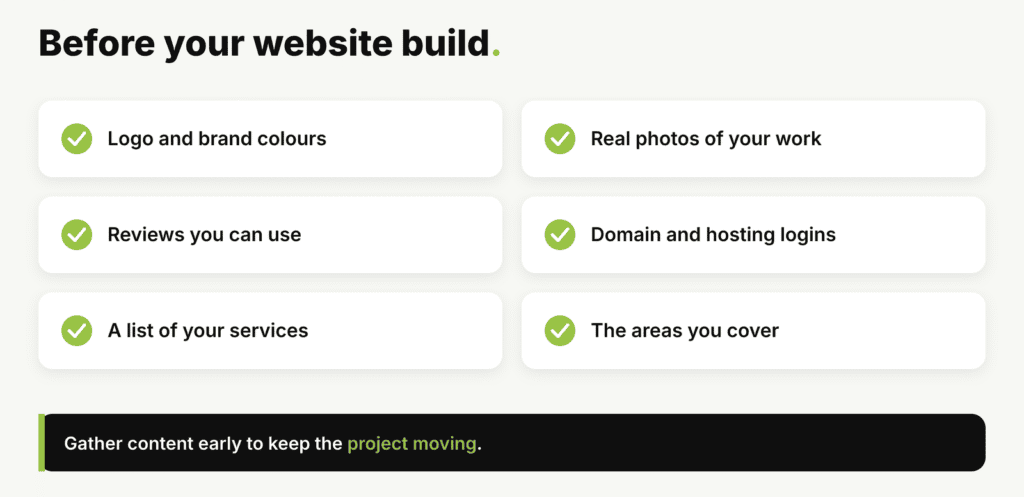
It saves time if you gather these before you start:
- Your logo and brand colours, for consistent branding across the site.
- Real photos of your team, premises and finished work.
- Reviews and testimonials you have permission to use.
- Login details for your domain name and any current hosting.
- A list of your services and the areas you cover.
Your domain name is your web address, such as yourbusiness.co.uk. Hosting is the rented server space where the website lives.
What makes a small business website fast and easy to use?
Keep pages light, menus short and text easy to read. Google recommends site owners achieve good Core Web Vitals. These measure how fast a page loads, how quickly it responds and how stable it stays while loading.
You can test any page for free with PageSpeed Insights, Google’s speed testing tool.
These website design tips for small business sites help on a small screen:
- Keep the navigation, the menu of links to your pages, short.
- Use plenty of white space, the empty space around text and images, so pages do not feel crowded.
- Compress photos so they load quickly.
- Put your phone number where it can be tapped to call.
Make it easy for everyone to use
Accessibility means people with disabilities can use your site. That includes people who use a screen reader, software that reads a page aloud.
The W3C, an organisation that develops web standards, publishes Easy Checks for a first review of web accessibility. The checks include page titles, image alt text, headings, colour contrast and keyboard access. Alt text is a short written description of an image.
Should you use a website builder or a web designer?
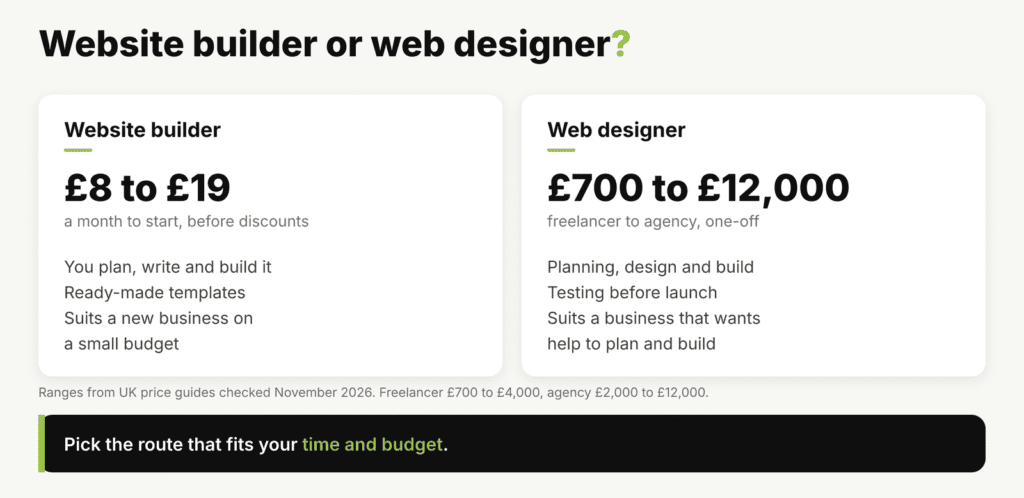
In our view, a website builder suits a new business with a small budget and simple needs, if you have time to do it yourself. A web designer suits a business that wants help to plan, write and build the site, or lacks the time to do it. Here is how we see each route.
When a website builder makes sense
A builder gives you templates, ready-made page layouts you fill in yourself. It can work well for a first site or a sole trader. It also suits an owner who wants to edit pages often and spread the cost.
We have seen builder sites rank well in Google too. The trade-off is your time, because you do the planning and wording yourself.
When a web designer makes sense
A designer usually brings a design process: planning, design, build and testing. Some also help with the wording. We build each website as a custom website, coded for that business rather than built from a template.
That suits businesses that want more help and a design made just for them. The trade-offs are a higher upfront cost and relying on a developer for bigger changes.
Check who owns what
Whoever builds your site, check in writing who owns the domain, the design and the content if you move on.
How much does small business website design cost in the UK?
Small business website design in the UK costs roughly £700 to £4,000 from a freelancer and £2,000 to £12,000 from an agency. Those ranges span the small business figures in four UK price guides we checked in November 2026, and the guides vary a lot. Basic sites and fixed-price packages can cost less, and some guides quote before VAT.
A website builder usually costs less upfront. Plans from five popular names start at about £8 to £19 a month before discounts, according to a March 2026 comparison by Startups.co.uk. The same guide puts the full range at £1.99 to £259 a month.
Many plans are billed yearly, so check the total cost before you sign up.
We price every website design project on its page count and the features it needs, such as an online shop. In our experience, who writes the content also affects the price. Both routes have running costs too, such as a domain name, hosting and upkeep.
How long does it take to design a small business website?
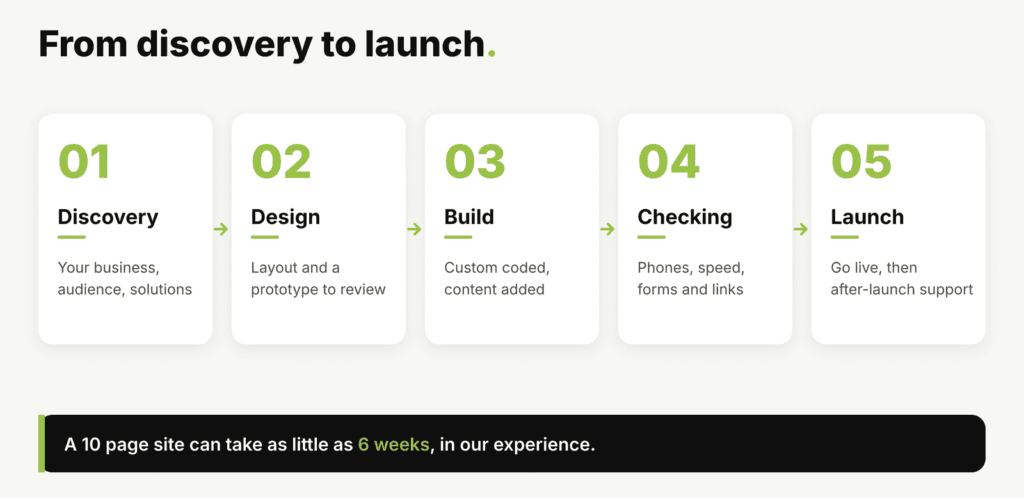
In our experience, a 10-page small business website can take as little as 6 weeks. Many of ours launch within 8 weeks of sign-off. The timescale depends on the size of the site and how quickly content arrives.
Bigger sites, ecommerce shops and sites waiting on photos or wording usually take us longer.
What slows a project down
The biggest delay we see is waiting for content, such as photos, reviews and service details. Gathering them early keeps a project moving.
In our experience, a new site will not bring enquiries overnight on its own. Reviews, your Google Business Profile, fresh content and time all play a part.
How we handle website design for small businesses
Every website we build is a custom-coded theme for that business, never a template or page builder. We start with a discovery session about your business, your audience and the solutions you offer. Then we plan the pages before any design work begins.
Our design process
From there, our process runs from design and prototyping to building, checking and launch, with support after launch. Our website design page shows the process in more detail, and our portfolio shows recent projects.
What one client said
One web design client, Gary Brooks, wrote in a review that he “really appreciated our honesty and strategic advice”. He added that “our attention to both aesthetics and SEO was spot on.”
After your site goes live
Once a site is live, it needs looking after. Our guide to website maintenance costs in the UK explains what to budget for each year.
Frequently asked questions
How do I create a website for my small business?
You have two routes: build it yourself with a website builder, or pay a web designer. Either way, register your domain name, plan your pages and write the content first. Then test the site on a phone before you launch.
Do I need a website for my small business?
Not every business needs one straight away. In our view, most benefit from one, because it gives customers a place to check your services, reviews and contact details. It also gives you a page that can appear in search results.
What is the best website builder for a small business?
In our view, there is no single best website builder, so look for one that works well on phones and lets you edit pages easily. Check it includes hosting and a secure connection, and that you can take your content with you if you leave. Try a free trial before you commit.
Is AI replacing web designers?
In my view, AI tools can now create a basic website quickly. Someone who understands your business still needs to plan the pages and explain the problems you solve. They also need to check that the site works and can rank.
Ready to plan your website?
If you would like help with small business website design, call us on 01246 556565 or contact us to book a discovery session.


